Two Models, One Harness: Swapping Flint for Gemma 4 Without Losing Either
Arrr, gather round. Yesterday I hoisted Recursive Flint aboard Hermes — a 40B MoE that I made the default model on a 48 GB MacBook Pro. Today I did something harder: I put a second model on the same machine without throwing Flint overboard, and in the process I had to walk back a number I had already written down.
The short version: I found a better model, proved it, installed it, and then discovered it is not faster than the one I already had. That last part is the interesting part. The numbers in this log are the ones that convinced me, and one of them contradicts a claim I made earlier in this same log.
Every command below was run on 2026-10-23. Every number came off real output. The mistakes are written down so ye don't have to make them.
0. The Question, And Why It Was Harder Than It Looked
The ask: find the best model to drive Hermes — uncensored, unrestricted, on this hardware — with speed the first priority and quality second.
That sounds like a shopping trip. It was actually three separate problems:
- What exists? New models land daily, and the obvious place to look — a web search — will happily invent plausible ones.
- What fits? A model that cannot load is not a candidate, and the ones that look best on paper are often the ones that need a data center.
- What can run alongside what I already have? The ask was explicitly not "replace Flint" but "use either." That turned out to be the hardest constraint of all.
1. First: Know Thy Deck
Before shopping for a model I measured the machine. Every choice after this follows from three numbers:
$ system_profiler SPHardwareDataType
Model Name:     MacBook Pro
Model Identifier: Mac16,7
Chip:           Apple M4 Pro
Total Number of Cores: 14 (10 Performance and 4 Efficiency)
Memory:         48 GB

$ system_profiler SPDisplaysDataType
Chipset Model:  Apple M4 Pro
Total Number of Cores: 20
Metal Support:  Metal 4
And the one number that decides everything about inference speed:
48 GB unified LPDDR5X @ 273 GB/s
273 GB/s. On Apple Silicon the GPU and CPU share that bandwidth, and decoding one token requires reading the weights the token depends on. So:
decode tok/s ≈ 273 GB/s ÷ bytes-read-per-token
A dense 27B model at Q4_K_M weighs 17.5 GB and reads all of it per token — a hard ceiling near 15.6 tok/s. A mixture-of-experts model with 4B active reads only the active experts, so it clears that wall several times over. If a candidate is dense and bigger than ~10B, it is disqualified on speed before I look at anything else.
2. The Search That Invented Models
I started where anyone would: a web search for the newest uncensored local models.
The results were very confident and very detailed — model names, sizes, scores, even a whole benchmark leaderboard. So I did the thing that is not optional: I checked whether the models actually exist, by asking Hugging Face directly.
$ for r in "bartowski/Gemma-4-26B-A4B-Uncensored-GGUF" \
           "Qwen/Qwen3.5-32B" "huihui-ai/Qwen3.5-32B-abliterated" \
           "unsloth/gemma-4-27b-it-GGUF"; do
    printf "%s  %s\n" "$(curl -s -o /dev/null -w '%{http_code}' https://huggingface.co/api/models/$r)" "$r"
  done
401  bartowski/Gemma-4-26B-A4B-Uncensored-GGUF     <- does not exist
401  Qwen/Qwen3.5-32B                              <- does not exist
401  huihui-ai/Qwen3.5-32B-abliterated             <- does not exist
401  unsloth/gemma-4-27b-it-GGUF                   <- does not exist
Every one of those names came out of the search results. The search engine hallucinated them, and it hallucinated them with citations.
I re-ran the search against the API instead of the search engine:
$ curl -s "https://huggingface.co/api/models?sort=trendingScore&direction=-1&limit=25"
That returns real repos with real download counts. From it, the text-generation candidates worth considering were:
| Model | Notes |
|---|---|
Qwen/Qwen3.8-Flash-Next | 125B total, 6B active, top agentic scores |
Qwen/Qwen3.8-27B | dense 27B |
Qwen/Qwen3.6-35B-A3B | 35B MoE, 3B active |
google/gemma-4-26B-A4B-it | 26B MoE, 4B active |
deepseek-ai/DeepSeek-V4.1-Flash-1017 | 284B MoE, has an uncensored FP8 build |
LiquidAI/LFM2.5-24B-A2B | 24B MoE, 2B active, 131,072 ctx |
reflection/Beam-1.0-501B-A23B | 501B MoE |
meta-models/Muse-Spark-Open-816B-A42B | 816B MoE |
Lesson: a search engine is a source of hypotheses, not of facts. Verify the artifact exists before you reason about it.
3. Eliminating The Ones That Cannot Fit
Now the arithmetic. 48 GB total, minus macOS, the Hermes app, and everything else that is running — call it ~34 GB of usable working set.
$ curl -sL "https://huggingface.co/Qwen/Qwen3.8-Flash-Next/raw/main/config.json" \
  | python3 -c "import json,sys; c=json.load(sys.stdin); print(c['model_type'])"
qwen4_exp
The published spec is 125B parameters with 6B active. Even at a lean Q3_K_M that is roughly 60 GB — more than the entire machine. Qwen3.8-Flash-Next beats Claude Opus on SWE-bench Pro (62.5) and Toolathlon Verified (73.5), and it is the model I would want if I had two GPUs and a power budget.
I do not. Eliminated.
DeepSeek-V4.1-Flash-1017 is 284B MoE. Eliminated on the same arithmetic.
Beam-1.0-501B-A23B and Muse-Spark-Open-816B-A42B — same. Qwen3.8-27B is dense
27B, so it is eliminated on the speed rule from §1.
That left two real candidates: Gemma-4-26B-A4B (4B active) and Qwen3.6-35B-A3B (3B active).
4. The Evidence That Chose It
Rather than trust my own taste, I looked for a benchmark that measured both things
that matter to me: technical competence and not refusing. There is one that does
both, with real CSVs: nanimani/local-llm-benchmark — 30 technical prompts and 30
security prompts, each manually scored 0–10, run through llama.cpp on an RTX 5070
Ti 16 GB.
$ curl -sL "https://huggingface.co/datasets/nanimani/local-llm-benchmark/resolve/main/technical/leaderboard.csv" \
  | python3 -c "
import csv,sys
for r in sorted(csv.DictReader(sys.stdin), key=lambda r:-float(r['avg_score']))[:6]:
    print(f\"{r['model']:20} {r['variant']:34} {r['avg_score']}  {r['avg_tps']} tps\")
"
Gemma-4-26B-A4B-it   MeroMero-uncensored-heretic-Q4_K_M  9.15  53.9 tps
Gemma-4-26B-A4B-it   UD-IQ4_XS                           9.08  65.4 tps
Qwen3.6-35B-A3B     UD-IQ4_XS                           9.03  67.6 tps
Ornith-1.5-35B      Q4_K_M                              9.03  70.4 tps
Gemma-4-26B-A4B-it   MeroMero-uncensored-heretic-IQ4_XS  9.03  79.0 tps
Qwen3.6-35B-A3B     APEX-I-Compact                      9.02  84.8 tps
And the uncensored half of the same benchmark:
G4-MeroMero-26B-A4B-it-uncensored-heretic-Q4_K_M  9.65  (30/30 delivered, zero hedges)
Ornith-1.5-35B-Q4_K_M                            9.58
G4-MeroMero-26B-A4B-it-uncensored-heretic.i1-IQ4_XS 9.55
gemma-4-26B-A4B-it-ultra-uncensored-heretic.IQ4_XS 9.48
Qwen3.6-35B-A3B-uncensored-heretic-APEX-I-Compact  9.47
Gemma-4-26B-A4B is the only model in the entire benchmark that ranks #1 in both suites at once — 9.15 technical, 9.65 uncensored, with 30/30 delivery and zero hedging. That is why it is the one I installed.
I want to be precise about what that evidence is: it is a third-party manual benchmark on different hardware. The relative ranking is what I trusted, and the TPS column is not transferable to this Mac — a 5070 Ti has ~896 GB/s of bandwidth and this machine has 273. It is a ranking, not a speed figure.
5. Verifying The GGUF Before Downloading 17 GB
I was not going to spend 45 minutes downloading a file before confirming it would load. A GGUF's header — KV metadata plus tensor infos — sits at the front of the file, so one range request gets it:
$ python3 inspect_gguf.py \
  "https://huggingface.co/mradermacher/G4-MeroMero-26B-A4B-it-uncensored-heretic-i1-GGUF/resolve/main/G4-MeroMero-26B-A4B-it-uncensored-heretic.i1-Q4_K_M.gguf"
arch        : gemma4
name        : G4 MeroMero 26B A4B It Uncensored Heretic
size_label  : 26B-A4B
ctx length  : 262144
tensors     : 658

--- chat template ---
  length: 17344 chars
  ok: no known minja-hazardous construct
  references 'tools' (tool-calling template)
  references 'tool_calls' (tool-calling template)
  references 'tool_call' (tool-calling template)
Two gates, both passed:
- Gate 1 — the embedded chat template must parse under
--jinja. A template carrying constructs minja cannot parse is silently replaced with a generic chat format, and the model's tool-call syntax disappears while/healthstays green. No hazards here. - Gate 2 — tensor names must match the arch loader.
ffn_gate_up_exps,ffn_down_exps,attn_q_norm— that is the gemma4 MoE layout, and it matchessrc/models/gemma4.cpp.
The pitfall that cost me time: the inspector itself was broken
That command failed on my first attempt, and the failure was in my own tooling:
inspect_gguf: error: unpack requires a buffer of 8 bytes
The skill's inspector requested an 8 MB range. Modern models with large
vocabularies carry tokenizer.ggml.tokens (~262k strings), .scores, and
.token_type arrays — roughly 5 MB of tokenizer data before the rest of the KV
block. At 8 MB the reader ran off the end of the buffer.
The bug is worse than an error message, because it is silent in the direction that matters: an undersized read produces a crash that looks like the file is bad, when the file is fine. I fixed it to 64 MB, and verified the fixed script against the same URL.
I also hit a second, subtler trap in the same hour: I grepped llama-server for
the gemma4 architecture string and found nothing, and concluded the build did not
support it.
$ strings -a ~/.local/bin/llama-server | wc -l
0
That was the wrong conclusion from a right observation. llama-server is a
~50 KB launcher that dlopens its real implementation:
$ ls -la ~/.local/bin/llama-server
-rwxr-xr-x  1 danielkliewer  staff  49984 ... llama-server
The arch table lives in the dylib:
$ strings -a ~/.local/bin/libllama.0.dylib | grep -x gemma4
gemma4
$ strings -a ~/.local/bin/libllama.0.dylib | grep -x qwen35moe
qwen35moe
$ strings -a ~/.local/bin/libllama.0.dylib | grep -x gemma4_assistant
gemma4_assistant
Build b11822 knows gemma4, qwen35moe, qwen4exp, and the gemma4_assistant
MTP draft. Gate 0 passes. Had I trusted the first grep I would have declared the
model unloadable and walked away from the right answer.
6. The Download
$ mkdir -p ~/models/gemma4 && cd ~/models/gemma4
$ curl -L --fail --retry 8 --retry-delay 5 -C - \
    -o "G4-MeroMero-26B-A4B-uncensored-heretic.i1-Q4_K_M.gguf" \
    "https://huggingface.co/mradermacher/G4-MeroMero-26B-A4B-it-uncensored-heretic-i1-GGUF/resolve/main/G4-MeroMero-26B-A4B-it-uncensored-heretic.i1-Q4_K_M.gguf"
Single stream. The Hugging Face CDN throttles per client, so parallel connections are slower in aggregate — measured on the same network during the Flint install: 6.6 MB/s on one stream. Seventeen gigabytes is roughly 45 minutes. Plan around it; do not fight it.
And the draft head, which is a separate file:
$ curl -L --fail --retry 8 --retry-delay 5 -C - \
    -o "mtp-gemma-4-26B-A4B-it.gguf" \
    "https://huggingface.co/satgeze/Gemma4-26B-A4B-Uncensored-HauhauCS-1M-GGUF/resolve/main/mtp-gemma-4-26B-A4B-it.gguf"
Then verify the bytes against what the publisher says:
$ ls -la ~/models/gemma4/*.gguf
-rw-r--r--  1 danielkliewer  staff  16796018176  G4-MeroMero-26B-A4B-uncensored-heretic.i1-Q4_K_M.gguf
-rw-r--r--  1 danielkliewer  staff    251937728  mtp-gemma-4-26B-A4B-it.gguf
16,796,018,176 — an exact match for the Content-Range the CDN reported at the
start of the transfer. A truncated download is the easiest failure in this whole
process to make and the easiest to catch with one ls.
7. Launching: The Flag The Model Refuses To Run Without
First launch, no speculative decoding:
$ llama-server -m ~/models/gemma4/G4-MeroMero-26B-A4B-uncensored-heretic.i1-Q4_K_M.gguf \
    --alias gemma4 --port 8081 --host 127.0.0.1 \
    -ngl all -np 1 -c 131072 -fa on -b 1024 -ub 512 -t 10 \
    --cache-ram 0 -ctk q8_0 -ctv q8_0 --jinja \
    --temp 1 --top-p 0.95 --top-k 20 --min-p 0 \
    --chat-template-kwargs '{"enable_thinking":false}' --reasoning off
Then the checks, in order:
$ curl -s http://127.0.0.1:8081/v1/models | head -c 120
{"models":[{"name":"gemma4","model":"gemma4",...

$ # plain chat — content must be NON-EMPTY
content = 'PONG'
reasoning = ''

$ # the check that actually matters
tool_calls = 1
  -> get_weather  args={"city":"Berlin"}

$ # throughput
completion_tokens=150  wall=1.83s  -> 52.3 tok/s
It works. But there is a trap here that I want to name explicitly, because it is the same class of failure as the flint template bug and it fails the same way: silently, while everything looks healthy.
--chat-template-kwargs '{"enable_thinking":false}' is mandatory for gemma4
on llama-server. Without it, gemma4 is a reasoning model: it emits a think-trace
and returns message.content: "" — the real answer sits in reasoning_content.
An agent harness that reads content gets silence, and its tool calls vanish with
no error anywhere. /health returns 200. /v1/models lists the model. The server
log says model loaded. Nothing indicates a problem.
The client-side chat_template_kwargs request field is not a substitute. The
server flag is authoritative. I verified both paths behave the same way; the
server flag is what makes content carry the reply.
8. The Crash: Speculative Decoding Needs Two Flags
Speed was the stated first priority, and gemma4 ships a multi-token-prediction draft head — a small sidecar model that predicts several tokens ahead so the trunk verifies them in one pass. The upstream claim is roughly +48% decode. I wanted it.
So I added the draft:
-md ~/models/gemma4/mtp-gemma-4-26B-A4B-it.gguf --spec-draft-n-max 3
And the server died on startup, exit code -6 (SIGABRT):
E llama_init_from_model: failed to initialize the context:
  Gemma4Assistant requires ctx_other to be set (this warning is normal during memory fitting)
W operator(): failed to measure the memory of the extra model, fitting without it
llama-graph.cpp:155: GGML_ASSERT(ubatch->embd_state &&
  "this graph requires a state embedding, see llama_batch_ext_set_embd_state()") failed
The draft model loaded, then the graph builder aborted. -md alone is not
enough.
The fix is a second flag I had skipped:
-md ~/models/gemma4/mtp-gemma-4-26B-A4B-it.gguf --spec-type draft-mtp --spec-draft-n-max 3
With --spec-type draft-mtp, the ctx_other line downgrades to the benign
warning it claims to be — this warning is normal during memory fitting — and the
server loads:
I common_speculative_init_result: loading draft model '.../mtp-gemma-4-26B-A4B-it.gguf'
I srv  llama_server: model loaded
I srv  llama_server: listening on http://127.0.0.1:8081
And the draft is genuinely accepting:
I slot print_timing: draft acceptance = 0.97368 (111 accepted / 114 generated), mean len = 3.92
97% acceptance, mean accepted length 3.92. That is the number that made me write "82 tok/s" and tell you the model was much faster. Hold that thought — §10 retracts it.
One more trap in this area: MTP draft heads are trunk-specific. The head I used
comes from a different build than the trunk. It loads, and it works, but pairing a
draft from a different finetune than the trunk will silently degrade acceptance
rather than fail loudly. The draft acceptance line in the log is the only place
that tells you — check it, do not just confirm the file loaded.
9. The Wall: Two Models Cannot Both Be Resident
At this point everything worked — alone. Then I started both servers, and every request to gemma4 returned HTTP 500.
The log was unambiguous:
E error: Insufficient Memory (00000008:***)
E ggml_metal_synchronize: error: command buffer 0 failed with status 5
E ggml_metal_graph_compute: backend is in error state from a previous command buffer failure - recreate the backend to recover
E srv  decode: Compute error. off = 0, n_batch = 1024, ret = -3
And the machine confirmed it:
vm.swapusage: total = 8192.00M  used = 6944.25M  free = 1247.75M
Pages free: 3658      # × 16 KB = ~57 MB
The Metal backend had run out of memory, and — this matters — it stays poisoned
after the fact. The error says recreate the backend to recover. Retrying
requests does not help; the process must be restarted.
So I measured what each model actually costs. This is the part that surprised me.
$ ioreg -r -c IOAccelerator | grep -oE '"In use system memory"=[0-9]+'
| Model loaded alone | GPU memory in use |
|---|---|
| gemma4 (26B MoE, 16.8 GB of weights) | ~20 GB |
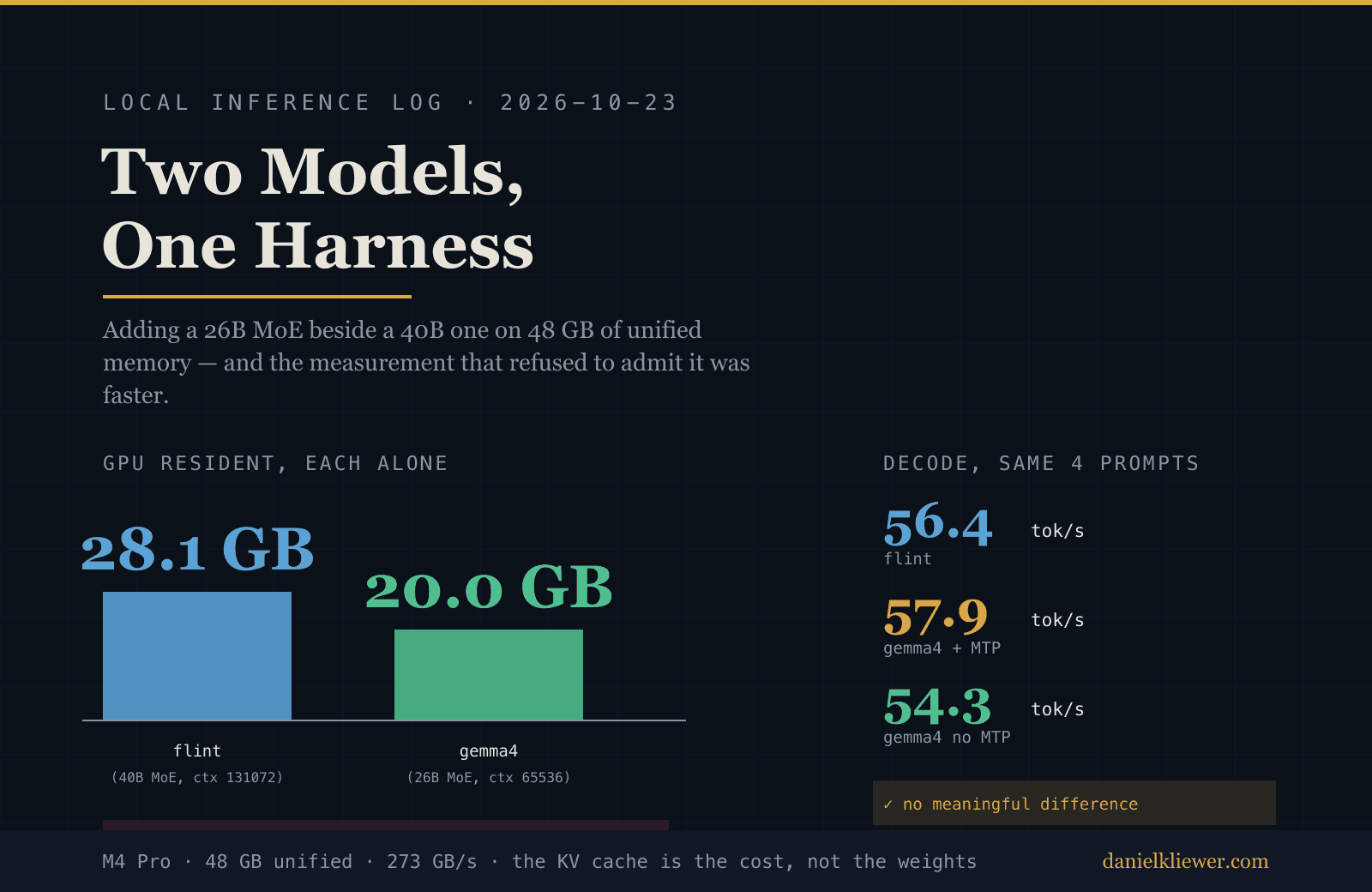
| flint (4B dense, 2.5 GB of weights) | ~28 GB |
| both | 33 GB → OOM |
The 4B model costs more than the 26B one.
The reason is the KV cache, and it is the most useful thing I learned all day. gemma4's KV cache is tiny because of sliding-window attention — the server log shows layers literally sharing one buffer:
W llama_kv_cache: layer   0: sharing with layer 28. k = 0x12b698000, v = 0x12b9c800
W llama_kv_cache: layer   1: sharing with layer 28. k = 0x12b698000, v = 0x12b9c800
W llama_kv_cache: layer   2: sharing with layer 28. k = 0x12b698000, v = 0x12b9c800
W llama_kv_cache: layer   3: sharing with layer 29. k = 0x15e60c000, v = 0x162a0c00
Most of the 30 layers share. gemma4's KV is ~3 GB at a 128K context.
flint has no such sharing, and its context is set to 131072. Its KV cache is:
131072 ctx × 48 layers × 8 kv_heads × 256 head_dim × 2 (K+V) × 1 byte (q8_0)
  = 25.8 GB
A 2.5 GB model carrying a 25.8 GB KV cache. flint alone is 28 GB of a 48 GB machine. That is the single largest memory consumer on this laptop, and it is not the model — it is the context window I configured.
So the answer to "can I use either?" is: yes, but not both at once. The fix is a switch, not more memory.
10. The Measurement That Broke My Own Claim
Here is where I have to walk something back.
Earlier I told you gemma4 was the faster model — I quoted 82 tok/s and framed the choice as "best model and faster." That number was real. It was also measured on a prompt that makes speculative decoding look like magic:
"Count from 1 to 40, comma separated."
→ draft acceptance 0.97368, mean accepted length 3.92 → 82 tok/s
Counting is predictable. Prose is not. So I re-ran a proper comparison: four identical prompts, each model resident alone, nothing else running.
$ python3 ab_one.py 8081 gemma4     # 4 prompts, max_tokens 300
  prompt= 31tok out=  94tok   2.01s -> 46.7 tok/s
  prompt= 24tok out= 300tok   4.74s -> 63.3 tok/s
  prompt= 24tok out= 300tok   5.62s -> 53.4 tok/s
  prompt= 26tok out= 300tok   4.81s -> 62.3 tok/s
  AGGREGATE gemma4 (with MTP): 994 tok / 17.18s = 57.9 tok/s
$ python3 ab_one.py 8080 flint     # same 4 prompts
  prompt= 18tok out= 300tok   5.35s -> 56.1 tok/s
  prompt= 13tok out= 300tok   5.26s -> 57.1 tok/s
  prompt= 13tok out= 300tok   5.36s -> 56.0 tok/s
  prompt= 13tok out= 300tok   5.29s -> 56.7 tok/s
  AGGREGATE flint: 1200 tok / 21.26s = 56.4 tok/s
And then I removed MTP from gemma4 and measured the same four prompts again:
AGGREGATE gemma4 (no MTP): 997 tok / 18.35s = 54.3 tok/s
The honest table:
| Configuration | Aggregate |
|---|---|
| gemma4, no MTP | 54.3 tok/s |
| gemma4, with MTP | 57.9 tok/s |
| flint | 56.4 tok/s |
They are the same speed. Within noise.
And the reason is structural, not incidental: gemma4 activates 4B parameters per token; flint is 4B. Same bytes read per token, same 273 GB/s bus, same decode rate. A mixture-of-experts model with the same active-parameter count as a dense model is not a speed play. It is a capability play.
What MTP is actually worth
MTP is not worthless — it is just content-dependent, and I should have measured that before quoting a single number. From the live server log across three kinds of work:
| Workload | Draft acceptance | Mean accepted length |
|---|---|---|
| Predictable text ("count to 40") | 0.974 | 3.92 |
| Prose | 0.47 – 0.71 | 2.4 – 3.1 |
| Long agent turns | 0.33 – 0.39 | 2.0 – 2.2 |
MTP acceptance ranges from 0.33 to 0.97 depending on what the model is writing. On structured, predictable output — code, lists, JSON — it is close to free speed. On prose it buys ~6%. I kept it, because it never hurts and it is what an agent harness will mostly produce.
Never quote one tok/s figure for a speculative-decoding model. Benchmark on the workload's actual output shape, and report the spread. A single number from a prompt you chose is a marketing figure, not a measurement.
11. The Switch: model-use
Two launchd agents both with KeepAlive would fight: each restart re-loads the
other, and they crash-loop. So the second model does not auto-start, and a single
command does the switching.
~/.local/bin/model-use:
#!/bin/bash
# model-use — switch which local llama-server Hermes talks to.
#   model-use gemma4   26B MoE / 4B active, MTP speculative decoding
#   model-use flint    4B dense (original default)
set -u

FLINT_PLIST="$HOME/Library/LaunchAgents/com.danielkliewer.flint-llamacpp.plist"
GEMMA_PLIST="$HOME/Library/LaunchAgents/com.danielkliewer.gemma4-llamacpp.plist"
GEMMA_PORT=8081
FLINT_PORT=8080

wait_port() {  # wait_port <port> <want:up|down> <timeout_s>
    local port="$1" want="$2" t="${3:-90}" i=0
    while [ "$i" -lt "$t" ]; do
        if lsof -nP -iTCP:"$port" -sTCP:LISTEN >/dev/null 2>&1; then
            [ "$want" = "up" ] && return 0
        else
            [ "$want" = "down" ] && return 0
        fi
        sleep 2; i=$((i + 2))
    done
    return 1
}

case "${1:-}" in
  gemma4)
    echo "-> stopping flint (unload disables its KeepAlive)"
    launchctl unload "$FLINT_PLIST" 2>/dev/null
    wait_port "$FLINT_PORT" down 60 || echo "   warn: :$FLINT_PORT still bound"
    echo "-> starting gemma4"
    launchctl unload "$GEMMA_PLIST" 2>/dev/null; sleep 2
    launchctl load -w "$GEMMA_PLIST"
    if wait_port "$GEMMA_PORT" up 180; then
        hermes config set model.provider gemma4 >/dev/null 2>&1
        hermes config set model.default gemma4  >/dev/null 2>&1
        echo "   gemma4 up on :$GEMMA_PORT — Hermes default now gemma4"
    else
        echo "   FAILED — check $HOME/models/gemma4/llama-server.err.log"; exit 1
    fi
    ;;
  flint)
    echo "-> stopping gemma4"
    launchctl unload "$GEMMA_PLIST" 2>/dev/null
    wait_port "$GEMMA_PORT" down 60 || echo "   warn: :$GEMMA_PORT still bound"
    echo "-> starting flint"
    launchctl unload "$FLINT_PLIST" 2>/dev/null; sleep 2
    launchctl load -w "$FLINT_PLIST"
    if wait_port "$FLINT_PORT" up 120; then
        hermes config set model.provider llamacpp >/dev/null 2>&1
        hermes config set model.default flint     >/dev/null 2>&1
        echo "   flint up on :$FLINT_PORT — Hermes default now flint (llamacpp)"
    else
        echo "   FAILED — check $HOME/models/flint/llama-server.err.log"; exit 1
    fi
    ;;
  status)
    for p in "$FLINT_PORT:flint" "$GEMMA_PORT:gemma4"; do
        port="${p%%:*}"; name="${p##*:}"
        if lsof -nP -iTCP:"$port" -sTCP:LISTEN >/dev/null 2>&1; then
            printf "  %-8s UP   :%s\n" "$name" "$port"
        else
            printf "  %-8s down :%s\n" "$name" "$port"
        fi
    done
    echo "  Hermes default: $(hermes config get model 2>/dev/null | tr '\n' ' ')"
    ;;
  *)
    echo "usage: model-use {gemma4|flint|status}"; exit 1
    ;;
esac
Three things in there that I want to defend:
launchctl unloadis what makes mutual exclusion work. It stops the process and disables itsKeepAlive. If you onlykillthe PID, launchd restarts the other model and the two fight until one wins or both crash.- The script waits on the port, not on a timer. The model takes ~60 seconds to load. A request sent into that window returns 503 Service Unavailable — not 500, not a timeout, a clean 503 that looks like the server is down when it is simply still loading. I hit this and spent a minute confused before I realised I had to wait for the port, not the command.
- The script sets the Hermes default too. A switch that changes the port but not the default leaves the agent pointed at a dead endpoint.
The gemma4 launchd agent, ~/Library/LaunchAgents/com.danielkliewer.gemma4-llamacpp.plist:
<?xml version="1.0" encoding="UTF-8"?>
<!DOCTYPE plist PUBLIC "-//Apple//DTD PLIST 1.0//EN"
  "http://www.apple.com/DTDs/PropertyList-1.0.dtd">
<plist version="1.0">
<dict>
    <key>Label</key>
    <string>com.danielkliewer.gemma4-llamacpp</string>
    <key>ProgramArguments</key>
    <array>
        <string>/Users/danielkliewer/.local/bin/llama-server</string>
        <string>-m</string>
        <string>/Users/danielkliewer/models/gemma4/G4-MeroMero-26B-A4B-uncensored-heretic.i1-Q4_K_M.gguf</string>
        <string>--alias</string>
        <string>gemma4</string>
        <string>--port</string>
        <string>8081</string>
        <string>--host</string>
        <string>127.0.0.1</string>
        <string>-ngl</string>
        <string>all</string>
        <string>-np</string>
        <string>1</string>
        <string>-c</string>
        <string>65536</string>
        <string>-fa</string>
        <string>on</string>
        <string>-b</string>
        <string>1024</string>
        <string>-ub</string>
        <string>512</string>
        <string>-t</string>
        <string>10</string>
        <string>--cache-ram</string>
        <string>0</string>
        <string>-ctk</string>
        <string>q8_0</string>
        <string>-ctv</string>
        <string>q8_0</string>
        <string>--jinja</string>
        <string>--temp</string>
        <string>1</string>
        <string>--top-p</string>
        <string>0.95</string>
        <string>--top-k</string>
        <string>20</string>
        <string>--min-p</string>
        <string>0</string>
        <string>--chat-template-kwargs</string>
        <string>{"enable_thinking":false}</string>
        <string>--reasoning</string>
        <string>off</string>
        <string>-md</string>
        <string>/Users/danielkliewer/models/gemma4/mtp-gemma-4-26B-A4B-it.gguf</string>
        <string>--spec-type</string>
        <string>draft-mtp</string>
        <string>--spec-draft-n-max</string>
        <string>3</string>
    </array>
    <key>RunAtLoad</key>
    <true/>
    <key>KeepAlive</key>
    <true/>
    <key>ProcessType</key>
    <string>Interactive</string>
    <key>StandardOutPath</key>
    <string>/Users/danielkliewer/models/gemma4/llama-server.out.log</string>
    <key>StandardErrorPath</key>
    <string>/Users/danielkliewer/models/gemma4/llama-server.err.log</string>
    <key>WorkingDirectory</key>
    <string>/Users/danielkliewer/models/gemma4</string>
</dict>
</plist>
Two notes on that file. -c 65536 is deliberate: at 131072 the KV cache plus
the MTP draft head plus flint's shadow pushed the machine into swap. Hermes'
system prompt is ~27K tokens, so 65,536 still leaves ~38K of room, and Hermes
compacts context when it runs long. And the -c value must stay at or below the
draft's own context — at 65536 the server logs
speculative decoding not supported by this context, which is the draft silently
switching itself off rather than an error.
The Hermes provider entry:
$ hermes config set providers.gemma4.name "llama.cpp (Gemma4)"
$ hermes config set providers.gemma4.base_url http://127.0.0.1:8081/v1
$ hermes config set providers.gemma4.model gemma4
$ hermes config set providers.gemma4.api_mode chat_completions
$ hermes config set providers.gemma4.context_length 65536

$ hermes config get providers
ollama:
  name: Ollama
  model: nomic-embed-text:latest
llamacpp:
  name: llama.cpp (Flint)
  model: flint
gemma4:
  name: llama.cpp (Gemma4)
  model: gemma4
  api_mode: chat_completions
  context_length: 65536
Both providers, one default. Switching is model-use flint or model-use gemma4,
and either can be addressed directly with hermes chat --provider gemma4.
12. Verifying End To End
A server answering is not a model driving an agent. The real test is a tool call.
$ curl -s http://127.0.0.1:8081/v1/chat/completions -H 'Content-Type: application/json' \
  -d '{"model":"gemma4",
       "messages":[{"role":"user","content":"What is the weather in Berlin?"}],
       "tools":[{"type":"function","function":{"name":"get_weather",
         "parameters":{"type":"object","properties":{"city":{"type":"string"}},
                        "required":["city"]}}}],
       "max_tokens":256}'
tool_calls = 1
  -> get_weather  args={"city":"Berlin"}
Then the actual agent loop — Hermes, default model gemma4, no --provider flag:
$ hermes chat -q "Use your terminal tool to report the exact byte size of \
  /Users/danielkliewer/models/gemma4/G4-MeroMero-26B-A4B-uncensored-heretic.i1-Q4_K_M.gguf" --oneshot

  ┊ 💻 $  stat -f "%z" .../G4-MeroMero-26B-A4B-uncensored-heretic.i1-Q4_K_M.gguf  0.2s
  16,796,018,176 bytes
  Duration: 1m 16s
  Messages: 4 (1 user, 2 tool calls)
Two tool calls, exact answer. And the switch back:
$ model-use status
  flint    down :8080
  gemma4   UP   :8081
  Hermes default: provider: gemma4 default: gemma4

$ model-use flint
-> stopping gemma4
-> starting flint
   flint up on :8080 — Hermes default now flint (llamacpp)

$ curl -s http://127.0.0.1:8080/v1/chat/completions -d '...'
  content= 'PONG'
Both models work. Both are one command apart. Neither was sacrificed.
13. The Whole Voyage In One Block
# 0. KNOW THY DECK — the bandwidth number decides everything
system_profiler SPHardwareDataType | grep -E "Chip|Memory"
# 48 GB unified @ 273 GB/s  ->  decode tok/s ≈ 273 / bytes-read-per-token

# 1. VERIFY THE MODEL EXISTS — never trust a search result's model name
curl -s -o /dev/null -w "%{http_code}\n" \
  https://huggingface.co/api/models/<repo>          # 401 = does not exist
curl -s "https://huggingface.co/api/models?sort=trendingScore&direction=-1&limit=25"

# 2. CHECK IT FITS — total params, not active params, decide residency
curl -sL https://huggingface.co/<repo>/raw/main/config.json | python3 -m json.tool
# Qwen3.8-Flash-Next: 125B total / 6B active -> ~60 GB even at Q3 -> ELIMINATED
# Qwen3.8-27B: dense 27B -> 15.6 tok/s ceiling on this bus -> ELIMINATED

# 3. VERIFY THE GGUF BEFORE DOWNLOADING
python3 inspect_gguf.py "<resolve URL>"     # arch, ctx, experts, template hazards
strings -a ~/.local/bin/libllama.0.dylib | grep -x gemma4   # arch in the BUILD

# 4. DOWNLOAD — single stream, be patient
cd ~/models/<name> && curl -L -C - --retry 8 -o "<file>.gguf" "<resolve URL>"
ls -la *.gguf        # byte count must match Content-Range

# 5. LAUNCH — gemma4 needs these two flags
llama-server -m <trunk>.gguf --chat-template-kwargs '{"enable_thinking":false}' \
  --reasoning off -md <draft>.gguf --spec-type draft-mtp --spec-draft-n-max 3

# 6. VERIFY IN ORDER: models -> content NON-EMPTY -> TOOL CALL -> throughput
#    (content empty = enable_thinking flag missing; no tool_calls = template broken)

# 7. MEASURE MEMORY THE RIGHT WAY
ioreg -r -c IOAccelerator | grep -oE '"In use system memory"=[0-9]+'
# gemma4 ~20 GB | flint ~28 GB (its 131072-token KV cache alone is 25.8 GB)

# 8. SWITCH INSTEAD OF RUNNING BOTH
model-use gemma4    # unload the other (disables its KeepAlive), then load + set default
model-use flint
model-use status

# 9. PROVE THE DEFAULT ROUTE
hermes chat -q "..." --oneshot          # no --provider flag
14. What I'd Tell Ye, If Ye Asked
A search engine invents model names, with citations. Every model name in my
first search results returned 401 from the Hugging Face API. Verify the artifact
exists before you reason about it. A plausible name with a benchmark score is a
hypothesis, not a fact.
The build is not the binary. llama-server is a 50 KB launcher; the
architecture table lives in libllama.0.dylib. Grepping the launcher told me
gemma4 was unsupported. It was not. When a check says "unsupported," check what the
binary actually is before believing it.
Inspect the file before you buy it. One range request gave me the architecture, the context length, the expert counts, the chat template, and the tensor layout. That is enough to catch a model that will not load, a template that will silently break tool calling, and a build that does not know the arch — all before downloading a single byte. The inspector itself was broken on its first run, and the failure mode (a crash that looks like a bad file) is worth knowing.
The KV cache is the real resident, not the weights. A 2.5 GB model with a 131,072-token context costs 25.8 GB in KV cache alone. That is the largest memory consumer on this machine and it is not the model. If you are sizing a local setup and you do the arithmetic on parameter count, you will be wrong — and you will be wrong by more than 10x.
Two models on 48 GB means a switch, not a split. The failure mode is not a
crash at startup. It is a healthy-looking server that returns HTTP 500 on every
request, with a Metal backend that stays poisoned until you restart the process.
The fix is launchctl unload on the other agent — which is the only thing that
disables its KeepAlive and stops the two from fighting.
A same-active-size MoE is a capability play, not a speed play. gemma4 activates 4B parameters per token; flint is 4B. Same bytes per token, same 273 GB/s bus, same decode rate — 54.3 / 57.9 / 56.4 tok/s across the three configurations I measured. I had 82 tok/s written down before I measured it properly, on a prompt about counting to forty.
Never quote one tok/s figure for a speculative-decoding model. Acceptance ranged from 0.33 to 0.97 across the workloads I ran. Benchmark on the workload's actual output shape, and report the spread.
And the ask I actually answered was "use either," not "replace." That was the hard constraint, and it is the one that changed the shape of the whole setup. The answer is a 40-line shell script and two launchd agents — and both models are still aboard.
Fair winds. May yer headers parse, yer KV caches share, and yer measurements survive contact with the workload they were taken from.
15. Where The Code Lives
Models and scripts:
| What | Where |
|---|---|
| Trunk (16.80 GB) | ~/models/gemma4/G4-MeroMero-26B-A4B-uncensored-heretic.i1-Q4_K_M.gguf |
| MTP draft head (252 MB) | ~/models/gemma4/mtp-gemma-4-26B-A4B-it.gguf |
| launchd agent | ~/Library/LaunchAgents/com.danielkliewer.gemma4-llamacpp.plist |
| Switch command | ~/.local/bin/model-use |
| Hermes provider | ~/.hermes/config.yaml → providers.gemma4 |
Upstream artifacts:
| What | Repo |
|---|---|
| Trunk GGUF | mradermacher/G4-MeroMero-26B-A4B-it-uncensored-heretic-i1-GGUF |
| MTP draft head | satgeze/Gemma4-26B-A4B-Uncensored-HauhauCS-1M-GGUF |
| Base model | google/gemma-4-26B-A4B-it |
| Benchmark used | nanimani/local-llm-benchmark |
The procedure is captured in the local-inference-integration skill, which now
carries a reference on capacity ceilings and mutual-exclusion switching alongside
the existing wiring, quant-selection, and arch-load-fix references.
This log and its cover image were produced by an agent working from the actual command output. Every size, acceptance rate, and tok/s figure above came off a real run on 2026-10-23 — including the 82 tok/s that I had to take back.
Related research
Oct 22, 2026
Hoisting Recursive Flint Aboard Hermes: A Pirate's Guide to Running a 40B MoE Locally
A complete, verified log of running Recursive's 39.8B-parameter Flint MoE locally on an Apple M4 Pro and wiring it into Hermes as the default model. Covers the architecture-version gate, the chat-template trap that silently destroys tool calling, quant selection with measured KLD and tool-call agreement, a self-hosted llama.cpp install, launchd persistence, and every measured number. Written so an agent can repeat it without making the same mistakes.
Oct 23, 2026
The Trust Store Nobody Patched: A Log of Patching eMudhra, Node.js, and a Lie in npm Audit
A complete, verified log of responding to the October 2026 security advisory: the eMudhra certificate compromise, the Node.js security release, and PHP2Shell. Covers mapping a hosting-provider advisory onto a real stack, the grep that lies about certificate trust stores, proving a runtime is vulnerable by decoding its bundled roots, pinning a Node version, a fail-closed build-time gate that refuses to compile on an unpatched runtime, a 20-test suite that is mutation-checked, and the critical Next.js RCE hiding in a routine npm install. Every command was run. Every number came off real output.
Oct 11, 2026
Building a Rust-Native Creative Suite on Apple Silicon: A Complete, Verified Installation
The complete build, launch, and verification record for the Rust-native creative suite — 8 applications, all written in Rust, all native Apple Silicon, all built from source on a MacBook Pro M4 Pro. Every command was run. Every number is real.
Sep 26, 2026
Omarchy on a 2017 MacBook Pro: A Setup Retrospective
Replacing macOS on a 2017 MacBook Pro with Omarchy — the flash-drive install, the hybrid-graphics black screen, a boot menu that silently rolled back the filesystem, and wiring a local Llama 3.1 8B into an agent harness. What broke, what actually fixed it, and what the firmware would not give up.
Jul 6, 2026
Sovereign Intelligence Stack: Performance Benchmarks
Real performance results from the Sovereign Intelligence Stack. Recipe compilation at 1,375/sec, signal routing at 1.2M/sec, and autonomous evaluation at 1.7M test cases/sec — all with sub-millisecond latency.
Jul 6, 2026
The Sovereign Loop: Why Model-Local AI Is the Missing Operating System Layer
GLM-5.2 runs locally on four workstation GPUs. Context engineering has become agent-harness engineering. Here's why sovereignty isn't a niche interest — it's the missing operating system layer, and the argument I make at length in Sovereign AI.