Building Hermes Video Agent: a local-first, human-in-the-loop video pipeline
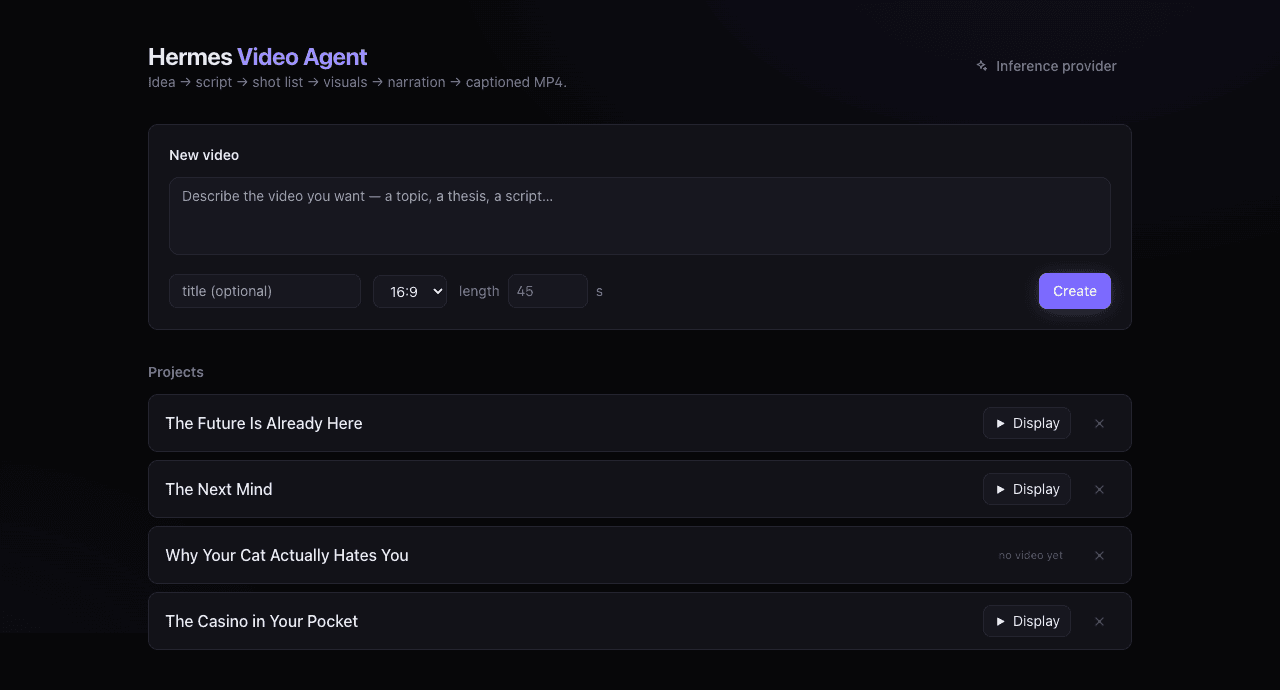

Two reads again. To you: a build log you can reproduce — exact commands, the API shapes we verified, and the mistakes we paid for. To the agent: a continuity record of what Hermes Video Agent is, how it is wired, and the environment rules that keep it from breaking, so a future session can pick up exactly where this one left off. Start at the Current environment reference if you are the agent.
Most "AI video" tools generate a finished artifact from a prompt and give you nothing to edit but the prompt. That is the wrong shape for real work. The tedious parts of short-form production — finding usable footage, checking licences, timing captions to speech, cutting the timeline — are exactly the parts a machine should do. The parts that decide whether the video is any good — what it argues, which image lands, when to cut — are exactly the parts a human should keep.
Hermes Video Agent is built on that split. It is an AI employee, not an AI
generator: it does the research and assembly, and it stops and asks before
every judgement call. The video lives as structured data (project.json)
long before it lives as pixels, so any scene can be inspected, re-voiced,
re-imaged, or skipped without rebuilding the project.
This post is the replication guide. It assumes you have the discipline layer
from the earlier method post
— verification-before-completion, git-worktree isolation, and the
env -u PYTHONPATH -u PYTHONHOME reflex. If you don't, read that first; this is
the worked example that follows it.
The shape of the system
Three cooperating pieces, deliberately separated:
| Layer | What it is | Where it lives |
|---|---|---|
| Engine | Python package hva/: the manifest, the stages, the providers | hva/, hva-cli.py |
| API | FastAPI service that owns the manifest and serves assets | hva/web/app.py (:8777) |
| Review UI | Next.js 14 app, the human-in-the-loop surface | webapp/ (:3008, proxies /api/* → :8777) |
The discipline that makes it tractable is the same one as the method post: one
manifest, many stages. Every stage reads projects/<id>/project.json and
writes it back. No stage asks a question; it reads what it needs or fails loudly.
When a stage produces garbage, you rerun that stage — not the whole video.
IDEA ─► SCRIPT ─► STORYBOARD ─► VISUALS ─► NARRATION ─► CAPTIONS ─► DRAFT ─► FINAL
              (you approve each gate before the next runs)
The five review panels map onto those stages:
- Script — write your own or generate with a local/cloud LLM.
- Storyboard — split the script into timed scenes.
- Visuals — fetch licensed candidates (Openverse + Wikimedia), pick one per scene, upload your own, or skip.
- Narration — voice each scene from a voice library, or upload a clip to clone a new voice.
- Export — burn-in captions and render the final MP4.

What you need before you start
| Requirement | Notes |
|---|---|
| macOS or Linux | developed on macOS 26 (Apple Silicon) |
| Python 3.12+ | tested on 3.14 |
| Node 18+ | tested on 22 (for webapp/) |
| FFmpeg | brew install ffmpeg. drawtext/libass not required |
| Playwright + Chromium | for visual research |
| Local LLM (optional) | any OpenAI-compatible server on :8080 for script/storyboard |
| ComfyUI (optional) | for generated imagery; a placeholder card is used otherwise |
| Vox voice clone (optional) | an existing venv with mlx-audio + mlx-whisper |
The single most important environment rule, unchanged from the method post:
env -u PYTHONPATH -u PYTHONHOME python3.12 -m venv .venv
macOS agent shells leak PYTHONPATH and PYTHONHOME into child processes. When
the agent launches a Python 3.12/3.14 venv for this SDK, a stray numpy from the
agent's own 3.11 environment can be pulled in and crash cv2/Pillow imports mid-
run. Stripping those two variables when creating or launching any child venv is
non-negotiable. It bit us here too, before it became muscle memory.
Step 1 — Clone and install
git clone https://github.com/kliewerdaniel/hermes-video-agent
cd hermes-video-agent

# Python backend
env -u PYTHONPATH -u PYTHONHOME python3.12 -m venv .venv
source .venv/bin/activate
pip install -r requirements.txt
python -m playwright install chromium

# Frontend
cd webapp
npm install
cd ..
The backend deps are deliberately light: fastapi, uvicorn, pydantic,
requests, playwright, pillow, numpy. No torch, no transformers in
this venv — the heavy ML for voice cloning lives in a separate venv you already
own (see Step 4). That separation is the trick that keeps this project from
needing a fresh ML install on every machine.
Step 2 — Run the backend
# from the repo root, with .venv active
env -u PYTHONPATH -u PYTHONHOME \
  HVA_TTS_PROVIDER=vox HVA_TTS_VOICE=Me \
  ./.venv/bin/python -m uvicorn hva.web.app:app --host 127.0.0.1 --port 8777
All switches are env vars prefixed HVA_:
| Variable | Default | Meaning |
|---|---|---|
HVA_TTS_PROVIDER | vox | vox | qwen | say | kleincannon |
HVA_TTS_VOICE | Me | default voice id |
HVA_VOX_VENV | …/vox/.venv/bin/python | interpreter that has mlx-audio |
HVA_VOX_VOICES | <root>/vox_voices | voice sample dir |
HVA_VOX_MODEL | mlx-community/Qwen3-TTS-12Hz-1.7B-Base-4bit | clone model |
HVA_VOX_STT | mlx-community/whisper-large-v3-turbo-asr-fp16 | ref-audio transcriber |
HVA_QWEN_TTS_URL | http://127.0.0.1:7860 | legacy qwen provider |
HVA_LLM_MODEL | local | default inference model id |
HVA_COMFY_URL | http://127.0.0.1:8188 | ComfyUI endpoint |
HVA_BACKEND | http://127.0.0.1:8777 | frontend → backend target |
Then the frontend, in a second terminal:
cd webapp
npm run dev        # http://127.0.0.1:3008  (proxies /api/* -> :8777)
Why a custom
server.mjsinstead ofnext devalone? Next's rewrite proxy has an undocumented ~30s timeout and drops in-flight sockets on every fast-refresh recompile. LLM/scriptgeneration takes 30–120s, so it 500s even when the backend succeeds.webapp/server.mjsruns Next with full HMR and proxies/api/*at the Nodehttplayer with no timeout, keeping API sockets alive across recompiles. Usenpm run dev(which runsserver.mjs), notnext devdirectly.

Step 3 — The API shapes (verified, not guessed)
Everything the UI does goes through hva/web/app.py. The shapes below are what
the running server actually returns — confirmed with curl, not inferred.
List projects — GET /api/projects
{
  "projects": [
    {
      "id": "demo-why-youre-still-scrolling",
      "title": "The Casino in Your Pocket",
      "idea": "…",
      "stage": "export",
      "scenes": 7,
      "duration": 36.5,
      "final": "final.mp4",
      "has_final": true
    }
  ]
}
final / has_final are computed server-side from the manifest — the landing
page uses them to decide whether to show a Display button or a "no video
yet" label. (This was a real bug: the list endpoint originally omitted those
fields, so no card ever showed Display. Fixed by enriching list_projects.)
Single project — GET /api/projects/{id} — the same dict plus TTS
metadata so the voice picker renders without a second round-trip:
{
  "tts_provider": "vox",
  "tts_voice": "Me",
  "voices": ["A", "John", "Me", "chris", "elon", "joe", "ken", "obama", "…"],
  "total_duration": 36.5,
  "has_draft": true,
  "has_final": true,
  "stages": ["script", "scenes", "visuals", "narration", "draft", "final"],
  "scenes": [ { "id": "scene_001", "narration": "…", "candidates": […], "selected": "…", "status": "approved" } ]
}
Voice library — GET /api/voices (lists samples for the active provider):
{ "voices": [ { "name": "Me", "url": "/api/voices/Me.wav" }, … ] }
POST /api/voices(name: str = Form(...),file: UploadFile) — upload + clone a new voice.DELETE /api/voices/{name}— remove a voice.GET /api/voices/{name}— serve the sample WAV.
Research a scene — POST /api/projects/{id}/research
{ "scene": "scene_001", "query": null, "limit": 4, "commercial_only": true }.
Returns nothing; the project manifest is updated and the UI re-fetches.
Inference providers — GET /api/inference (redacted config),
GET/POST /api/inference/models (live model list, transient overrides),
POST /api/inference/test (connection check). API keys are never sent in
request bodies — the server reads them from inference.json; the UI only ever
sees a redacted view («redacted:sk-…»).
Step 4 — Vox TTS: in-process voice cloning (the integration we actually built)
The headline feature of this build: the narration voice picker is not limited to a default voice. It lists every cloned voice, lets you upload a short clip to clone a new one, play samples, select a voice for the whole project, and delete voices — all wired to real endpoints, with no external TTS server required.
The decision that made this cheap: bridge into an existing vox venv that
already ships mlx-audio, rather than installing MLX into hva's own venv.
Lowest risk, model already downloaded, both mlx_audio.tts.utils.load_model and
mlx_audio.stt.load import cleanly from that interpreter. Voices live in hva's
own vox_voices/ dir, so the app stays self-contained.
# hva/providers/tts.py — _vox_generate shells out to the vox venv
cmd = [
    str(config.VOX_VENV), "-c", SNIPPET,
    config.VOX_MODEL_ID, ref_audio, transcription, out_wav,
]
subprocess.run(cmd, check=True, capture_output=True)
SNIPPET loads Qwen3-TTS, transcribes the reference audio with Whisper
(HVA_VOX_STT), chunks the target text on sentence boundaries, clones per chunk,
and concatenates with a silence gap. A direct smoketest produced a 1.76s clip in
~10s — proving the model loads and cloning works with no :7860 server.
The provider registry is one dict:
PROVIDERS = {
    "vox":        _vox_generate,
    "qwen":       _qwen_generate,   # legacy external Flask server
    "say":        _say_generate,    # macOS built-in
    "kleincannon":_kc_generate,
}
Swapping TTS is one function and one registry entry; no other module knows which ran. That is the "providers are adapters" rule from the architecture, enforced.

Step 5 — Visual research & licensing
Rather than asking an LLM which image to use, the agent goes and looks:
- Openverse API (keyless) — the workhorse; full licence metadata.
- Wikimedia Commons via Playwright — real Chromium driving MediaSearch.
- Openverse website via Playwright — fallback only; Cloudflare 403s headless.
Hits from every search term are pooled and ranked against the scene's own vocabulary before download. Each candidate records why it was proposed:
scene_002  ranked #1 for 'casino bokeh lights' (score 2.31) on openverse/flickr
           Neon light — Rd. Vortex — CC BY
Licensing. --commercial-only is the default, and on top of Openverse's own
commercial filter the agent excludes NoDerivatives licences — every still is
cropped and Ken-Burns-zoomed, which is a derivative work. checks.py flags any
ND asset that sneaks in through upload or manual selection.
Empty-scenes bug we fixed: hard-coded
commercial_only=Truereturned 0 Openverse hits for niche queries ("empty corporate office at night"), and the Wikimedia fallback was 403-blocked — leaving scenes silently empty. Fix: after the commercial-only pass, if the pool is under the limit, backfill from the full catalogue (commercial hits still ranked first). Verified: scene_001 went 0 → 2 candidates, scene_005 0 → 1.
Step 6 — Captions without libass
FFmpeg on this Mac ships without libass/drawtext. Text filters are
permanently unavailable in the bottled build. So captions are rasterized with
Pillow to transparent PNGs (width-aware wrapping, CAPTION_SIDE_MARGIN=0.06)
and composited with FFmpeg's overlay filter.
# hva/stages/captions.py — verified 0 overflow on 9:16 and 16:9 after the fix
def _wrap_px(text, max_px): ...   # wrap by rendered pixel width, not char count
def _available_text_px(aspect): ...
No system ffmpeg change required; the pipeline stays self-contained. Verify your
build with ffmpeg -hide_banner -filters | grep -iE "subtitles|drawtext" before
assuming text filters exist — they likely don't.
Step 7 — Render & human review
./hva-cli.py render <id>            # draft.mp4
# review in the UI, then:
./hva-cli.py render <id> --final    # final.mp4  (+ regenerated CREDITS.md)
The Export panel keeps only Render final video + the burn-in captions checkbox + Watch/Export links. (We removed the "Narrate all" and "Build captions" buttons from Export — those jobs belong to their own steps, and the dead UI just invited confusion.) Per-scene you can re-voice, replace the visual, or skip — each is an isolated stage re-run.
Hard-won lessons
- Strip
PYTHONPATH/PYTHONHOMEon every child venv. Silent until it isn't. Theenv -u …prefix is mandatory, not stylistic. - Never run
next buildwhilenext devis running. It wipes the dev module cache and the next start 500s withMODULE_NOT_FOUND. Killdevfirst. - The list endpoint must carry the same fields the detail endpoint does. The
landing page showed no Display buttons for weeks because
list_projectsomittedfinal/has_final. One serializer, one contract. - Voice picker needs TTS metadata on the project payload. It originally read
project.voiceswhich wasundefinedbecause only/api/envemitted voices. Attachvoices/tts_provider/tts_voiceto_serializeand the UI just works. - FFmpeg may lack
libass. Rasterize (Pillow) +overlay. Don't reach forsubtitles/drawtext. - Local-first is a constraint, not a slogan. No cloud APIs means the pipeline
owns its models. Voice cloning via Qwen3-TTS is non-commercial — a commercial
build swaps the TTS engine (the
kleincannon/sayproviders are the escape hatches). - Verify before completion. Run the check in the message where you claim success. A previous green run proves nothing about the tree you are about to integrate.
- Never publish without explicit approval. Drafts go to a staging area; the blog and site are not pushed until reviewed.
How to verify it actually works
# backend up?
curl -s http://127.0.0.1:8777/api/env | python3 -m json.tool

# a project's voices resolve?
curl -s http://127.0.0.1:8777/api/voices | python3 -m json.tool

# upload a voice (real endpoint, Form data)
curl -s -F "name=Morgan" -F "file=@clip.wav" http://127.0.0.1:8777/api/voices

# final video serves?
curl -s -o /dev/null -w "%{http_code} %{content_type}\n" \
  http://127.0.0.1:8777/api/projects/<id>/file/final.mp4

# frontend type-checks clean
cd webapp && npx tsc --noEmit
Current environment reference
For the agent, to reconstruct state from bare setup to now.
Agent
- Hermes Agent — install via
curl -fsSL https://hermes-agent.nousresearch.com/install.sh | bash;hermes setup;hermes doctor. - Docs: https://hermes-agent.nousresearch.com/docs/ · Source: https://github.com/NousResearch/hermes-agent
Local services (run by the user, long-lived — agent reuses, never kills)
- ComfyUI image generation on
:8188(optional; placeholder card otherwise). - Local LLM (
llama-serveror similar, OpenAI-compatible) on:8080for scripts/prompts (optional). - Vox voice-clone venv (separate, with
mlx-audio+mlx-whisper) — thevoxTTS provider shells out to it; agent never launches/kills it.
This project
- Hermes Video Agent — repo: https://github.com/kliewerdaniel/hermes-video-agent
- Backend: FastAPI
hva.web.appon:8777. Frontend: Next.js 14 inwebapp/on:3008, proxying/api/*→:8777viaserver.mjs. - TTS default
vox(in-process Qwen3-TTS clone), voiceMe. Alsoqwen/say/kleincannon. - Inference providers: local / gemini / openrouter (config in
inference.json, redacted on read).
Environment rule that prevents the most common breakage
env -u PYTHONPATH -u PYTHONHOME python3.12 -m venv .venv
Blog & site (do not push without approval)
- Canonical posts:
~/a10/blog/ - Site build source:
~/a10/sovereign-ai-site/content/blog/ - Standing rule: drafts are local; nothing is committed or deployed until reviewed.
Closing
An agent that makes videos is not a product you bought. It is infrastructure you own — software you wrote, instructions you captured, and a loop that gets cheaper every time you use it. Hermes Video Agent is the worked example of the method from the earlier post: software with a skill beside it, driven by the agent, stopping at every human gate.
The loop is the product. Teach it the next thing.
Related research
Aug 5, 2026
How I Taught an Agent to Edit Video — and the Repeatable Method Behind It
A methodology guide and continuity record: how a bare Hermes Agent became a video-editing assistant — and the repeatable, domain-independent method behind it. GreenPatch and a private vertical-video pipeline appear as worked examples of the pattern, not prescriptions.
Aug 8, 2026
Building a Local-First Rehab Cost Analyzer with an AI Agent (Full Build + Replication Guide)
A full retrospective and replication guide for rehab-analyzer: a local-first real-estate rehab cost estimator built entirely with Hermes Agent. Covers the architecture, the provider/adapters, the real-photo pipeline (Redfin via Playwright, Google Places, Street View, Esri, Geoapify), the local-LLM estimate step, every bug we hit, and the exact Hermes environment setup that makes the whole thing reproducible.
Jul 23, 2026
Building the Scientific Question Compiler: A Map of What We Do Not Know
We built the second compiler in the Scientific State program: the Scientific Question Compiler, which turns a corpus into a map of what humanity does not yet know. Local-first, running on a 35B model on our own hardware. Here is what we built, what broke, and what it means.
Jul 23, 2026
Compiling the State of Human Understanding: A Roadmap for the Scientific State Compiler
A research roadmap: the four compiler directions — Mechanistic Reasoning, Scientific Question, Scientific State, and Discovery — are not competing projects. They are five passes in one architecture that compiles the scientific corpus into a versioned, executable model of human understanding. Here is the full plan.
Jul 22, 2026
If the Loop Is the Product, Observability Becomes the Operating System
Yesterday I argued scientific knowledge needs a compiler, not a better research assistant. Today I built the general one — five discovery passes, local-first version control for understanding, and a live explorer. This is what it means when the loop, not the model, is the product.
Jul 21, 2026
Compiling Medical Evidence: A Clinical Research Compiler That Turns Guidelines and Trials Into a Queryable Knowledge Artifact
How to compile medical guidelines, trials, and literature into a provenance-tracked, queryable Clinical Knowledge Artifact — and deploy a live evidence explorer to Vercel — by extending the Research Compiler Agent SDK into a Clinical Research Compiler.